

Cloud Api
The Cloud api input transform supports basic CRUD (Create,read, update and delete) operations to different systems.
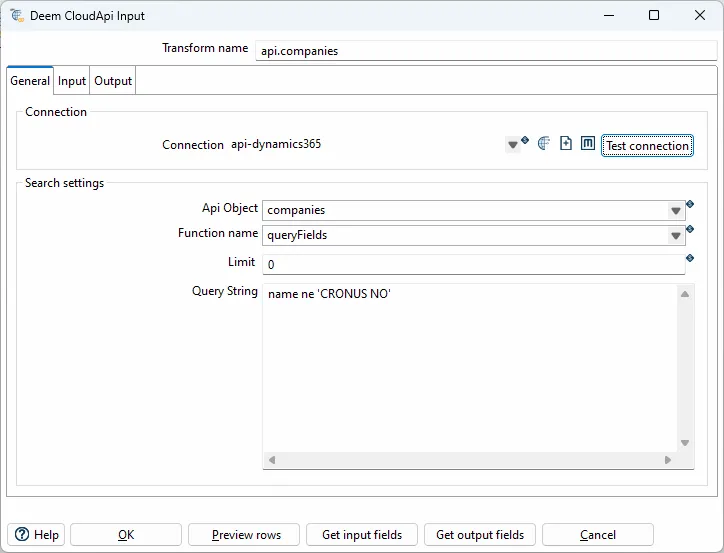
General options
| Option | Description |
|---|---|
| transform name | Name of the transform. |
| Client type | Set api:ionapi-datalake |
| Host | Set file url to ?.ionapi file. Supports variables. |
| Api object | Selected object. Select an existing object from the Datalake catalog. |
| Function name | Select queryAll or query. queryAll - Payloads query - Compass Either you can change the IONAPI_FILE parameter in the project properties file, or you can browse and select the desired ionapi file. The kettle.properties file are located under the KETTLE_HOME/.kettle folder. |
| Query string | Query string to compass or filter for the payload api. Variables and some context objects for dynamic querys are supported. Use the $+{VARIABLE_NAME}+ syntax to access JVM variables defined in kettle.properties |
| Type | Description |
|---|---|
api:deem | Deem Insight |
api:dynamics365 | Microsoft Dynamics 365 |
api:ionapi-datalake | Infor Ion Datalake |
api:ionapi-m3 | Infor Ion M3 - M3 Api’s |
api:ionapi-m3-query | Infor Ion M3 - EXPORTMI query |
api:m3 | Infor M3 - M3 On-prem Api’s |
api:odata | Any OData service, including Business Central and a Deem Insight data feed |
api:rambase | Rambase queries |
api:xledger | XLedger GraphQL |
Connection file
Section titled “Connection file”The Host field points at a connection file: a flat JSON object with the .cloudapi extension,
normally kept in the Integrator conf folder. Every client reads the same key names, so one file
works for any client that speaks the same protocol.
| Key | Used for |
|---|---|
urlApi | service root, or a full URL including its query string when the client reads one ready-made URL |
urlAuthorization | OAuth2 token endpoint |
clientId / clientSecret | OAuth2 client credentials |
username / password | HTTP login |
grantType | OAuth2 grant — client_credentials by default |
scope | OAuth2 scope |
resource | the resource the token is bound to. Required for a Deem Insight data feed |
queryOptions | query options the service accepts, comma separated without the dollar sign ("top,skip"). Blank allows all |
company | company inside the remote service. A name is sent as company=, a GUID as companyId= |
proxy_host / proxy_port | outbound proxy |
How the client authenticates follows from the file, not from a setting. With clientId and
clientSecret it fetches an OAuth2 token; with only username and password it uses HTTP basic
auth. A password that starts with Encrypted is decoded the same way the Integrator decodes its
own, so you can copy one straight out of another config.
JSON has no comment syntax, and // makes the file unreadable. Put notes in a _note key instead —
an array of lines, which the client ignores along with every other unknown key.
Example — Microsoft Business Central
Section titled “Example — Microsoft Business Central”OAuth2 client credentials against an app registration:
{ "_note": [ "company: a GUID is sent as companyId=, a name as company=.", "Business Central rejects an id passed as a name." ], "urlApi": "https://api.businesscentral.dynamics.com/v2.0/<entra tenant id>/Production/api/v2.0", "urlAuthorization": "https://login.microsoftonline.com/<entra tenant id>/oauth2/v2.0/token", "clientId": "<app registration client id>", "clientSecret": "<app registration client secret>", "scope": "https://api.businesscentral.dynamics.com/.default", "grantType": "client_credentials", "company": "<company id>"}Both api:odata and api:dynamics365 read this file unchanged. Use api:odata for new
connections — it is the general client and does everything the Business Central one does.
Example — a third-party OData feed
Section titled “Example — a third-party OData feed”One ready-made URL, HTTP basic auth. The client reads the URL you give it and then follows the
service’s own next-page links until the feed is exhausted, so there is no need to loop over
$top / $skip in the pipeline:
{ "_note": [ "urlApi: the full start URL including its query string.", "queryOptions: set it when the service rejects $select, $filter or $orderby.", "password: plain text, or an 'Encrypted ...' value from another config." ], "urlApi": "https://feed.example.com/api/reports/odata/<entity set>", "username": "<http login>", "password": "<http password>", "queryOptions": "top,skip"}Pick the url object in the transform, and either leave the URL in the file or send it per row in
the url input field — the row wins. Page size is set in the transform, not in the URL.
Example — a Deem Insight data feed
Section titled “Example — a Deem Insight data feed”Reading a published data feed from another Deem Insight instance:
{ "_note": [ "urlApi: a concrete feed address. /odata alone only lists the available ones.", "resource: required. Without it the token is bound to the /api base and the feed answers 401.", "company: ignored by Insight, but must be non-blank." ], "urlApi": "https://insight.example.com/deem/odata/orm", "urlAuthorization": "https://insight.example.com/deem/oauth2/token", "clientId": "<login access key>", "clientSecret": "<login access client secret>", "resource": "https://insight.example.com/deem/odata", "grantType": "client_credentials", "company": "default"}clientId and clientSecret come from a Login access row in the Insight instance you are
reading, of type TOKEN: its Key is the clientId, its Client secret the clientSecret,
and it must be linked to a User — the reads run as that user, and the connection is rejected
without it. The login profile and location on that row decide where the client may connect from,
and the location has to allow API clients.
What the connection may read follows from that user’s roles, and permissions are loaded at login, so grant them before the first connection or reconnect afterwards.
Generate rename SQL
Section titled “Generate rename SQL”The Rename SQL button generates the SQL for the next step in the staging → catalog
flow: a SELECT that reads the staging table and renames each column to a snake_case
version of the CloudApi field description (e.g. SELECT cono AS "company_no").
Field descriptions are fetched from the CloudApi metadata service (cached), so a
connection is required the first time the button is used, and the descriptions are
always current even when the Comments column in the dialog is empty. The api object name
is used as the staging table name in the FROM clause, and any rename from the Select
tab is reflected in the source column names.
Key fields are kept active in the SELECT; the remaining fields are commented out so you
can enable the ones you need. The result is shown in a read-only, copyable SQL dialog.
Deem Insight
Section titled “Deem Insight”With the CloudApi client you can read and write to objects in the Deem Insight database.
Functions:
- get, get one record upon the rid key
- list, list selected fields from an object with actual filter
- upsert, create or update record by setting all fields in the primary key
- update, update existing record using rid as key
- deleteHard, delete record using rid as key
- export, list selected fields from an object (key, name, ++ from related records are included)
- dbExport, export object to default data-warehouse database
Call M3 Api’s (On-prem). Metadata are loaded from MRS100 in M3.
Datalake
Section titled “Datalake”Payload (queryAll)
Section titled “Payload (queryAll)”The “Query string” field should only include the filter when using the queryAll function (Payload).
Examples:
dl_document_date gt '$sessiontime.addHours(${DATALAKE_HOURS})'
dl_document_date gt '$sessiontime.addHours(-6)'
dl_document_date gt '$sessiontime.addDays(${DATALAKE_DAYS})'
dl_document_date gt $time.addDays(-2)
dl_document_date range [$time.addDays(-2), $time.addDays(1)]
dl_document_date range [2019-09-01T10:00:01.410Z, 2019-09-13T11:00:01.700Z]
Compass (query)
Section titled “Compass (query)”select $fields from $object where timestamp>'$time.addHours(${DATALAKE_HOURS})'
Microsoft
Section titled “Microsoft”Dynamics365
Section titled “Dynamics365”Query context
Section titled “Query context”| Field | Description |
|---|---|
| date | QueryDateTime object with “yyyy-MM-dd” format |
| datetime | QueryDateTime object with “yyyy-MM-dd’T’mm.ss.SS.‘Z’” format |
Input fields
Section titled “Input fields”| Field | Description |
|---|---|
| company | select company by id or name |
| queryFilter | Filter (changed last 200 days) e.g: systemModifiedAt ge $datetime.addDays(-200) |
| queryOrderBy | e.g: name asc |