

Table Examples
Overview
Section titled “Overview”This section provides practical examples of table configurations. Each example includes the complete script and a description of what it does.
Example 1: Purchased QTY Table
Section titled “Example 1: Purchased QTY Table”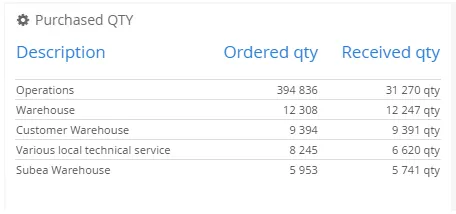
$olap.addTable( "1", "Purchased QTY", "cog", "", "5")$olap.addTableColumn( "1", "1", "Description", "[accounting_control_description]", "string")$olap.addTableColumn( "1", "2", "Ordered QTY", "SUM([ordered_quantity])", '#,###')$olap.addTableColumn( "1", "3", "Received QTY", "SUM([received_quantity])", '#,###', 'NULL', 'QTY')$olap.setTableGroupBy( "1", "col1")$olap.setTableOrderBy( "1", "col2 desc")$olap.setTableSize( "1", "XS12", "SM3", "MD3", "LG3")Description:
- Creates a table showing purchased quantities
- Groups by description (col1)
- Orders by ordered quantity descending (col2 desc)
- Limits to top 5 rows
- Shows three columns: Description, Ordered QTY, and Received QTY with “QTY” suffix
- Responsive sizing: full width on mobile, 3/12 on larger screens
Related
Section titled “Related”- Intro Tables - Overview of table documentation
- Table Method Overview - Complete method reference
- Graphs, Tables and KPIs - Overview of all widgets