

Get Timestamp
Overview
Section titled “Overview”The Get timestamp transform makes it easier to create dynamic staging pipelines where it is possible to run the pipeline if the table are missing (first runtime).
This transform retrieves the maximum timestamp value from a specified column in a table. If the table or column doesn’t exist, it returns a default value, making it ideal for incremental load scenarios where you need to track the last processed timestamp.

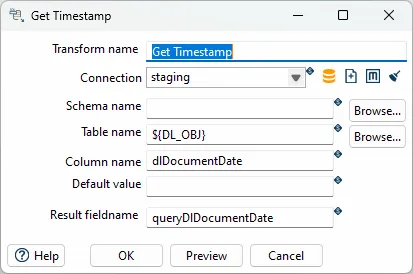
Configuration Options
Section titled “Configuration Options”| Option | Description |
|---|---|
| Transform name | Name of the step |
| Connection | Select predefined database connection |
| Schema name | The name of the Schema for the table to read data from |
| Table name | Name of the source table |
| Column name | Name of the table column with timestamp |
| Default value | Use this value if no value found (missing table of column) |
| Result fieldname | The name of the field to put the result of the sql |
How It Works
Section titled “How It Works”The transform executes a SQL query to get the maximum value from the specified column:
SELECT MAX(column_name) FROM schema_name.table_nameIf the table or column doesn’t exist, or if the query returns NULL, the transform returns the Default value instead. This makes the pipeline resilient to missing tables, which is useful for first-time runs.
Best Practices
Section titled “Best Practices”Incremental Load Pattern
Section titled “Incremental Load Pattern”This transform is typically used in the following pattern:
- Get Timestamp → Get last successful run timestamp (or default for first run)
- Input Transform → Read data filtered by timestamp (e.g.,
WHERE modified_date > ${LAST_TIMESTAMP}) - Transform → Process and transform the data
- Output → Write to target table
- Update Timestamp → Store new timestamp for next run (can be done in a separate step or workflow)
Default Value Strategy
Section titled “Default Value Strategy”Choose your default value carefully:
- Too old: May cause processing of too much historical data on first run
- Too recent: May miss data that should be processed
- NULL handling: Ensure your default value is compatible with your timestamp column type
Performance Considerations
Section titled “Performance Considerations”- Index the timestamp column: Ensure the timestamp column used for filtering has an index
- Use appropriate data types: Use proper date/datetime types rather than strings
- Timezone awareness: Be aware of timezone issues when comparing timestamps
Common Use Cases
Section titled “Common Use Cases”- Incremental data loads: Get last processed timestamp to load only new/changed records
- Staging pipelines: Track last successful staging run
- Data synchronization: Determine which records need to be synchronized
- Audit trails: Track when data was last processed
Related
Section titled “Related”- Transforms Overview - Overview of all transforms
- Staging Upsert Output - Upsert to staging tables