

Deem Datalake Input
Overview
Section titled “Overview”The Deem Datalake Input transform reads data from Infor Ion Datalake using either the queryAll (Payload) or query (Compass) functions.
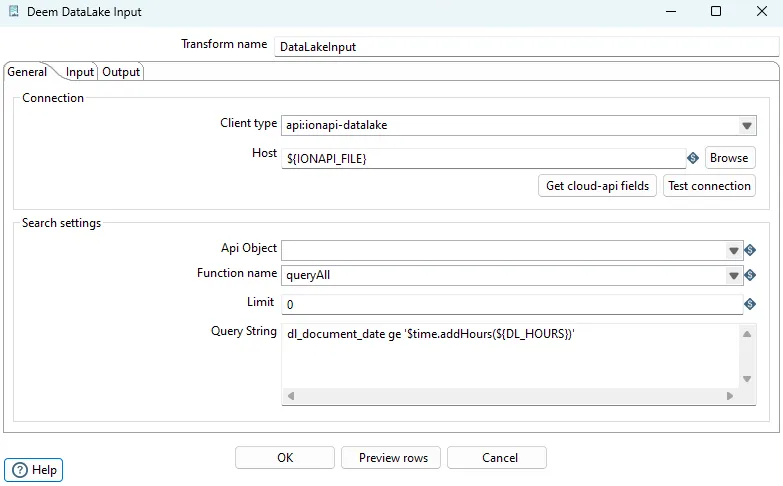
Configuration Options
Section titled “Configuration Options”| Option | Description |
|---|---|
| Transform name | Name of the transform |
| Client type | Set api:ionapi-datalake |
| Host | Set file URL to ?.ionapi file. Supports variables |
| Api object | Selected object. Select an existing object from the Datalake catalog |
| Function name | Select queryAll or query |
| Query string | Query string to compass or filter for the payload api |
Variables and some context objects for dynamic queries are supported. Use the ${VARIABLE_NAME} syntax to access JVM variables defined in kettle.properties.
Payload (queryAll)
Section titled “Payload (queryAll)”The “Query string” field should only include the filter when using the queryAll function (Payload).
Examples:
dl_document_date gt '$sessiontime.addHours(${DATALAKE_HOURS})'dl_document_date gt '$sessiontime.addHours(-6)'dl_document_date gt '$sessiontime.addDays(${DATALAKE_DAYS})'dl_document_date gt $time.addDays(-2)dl_document_date range [$time.addDays(-2), $time.addDays(1)]dl_document_date range [2019-09-01T10:00:01.410Z, 2019-09-13T11:00:01.700Z]Compass (query)
Section titled “Compass (query)”select $fields from $object where timestamp>'$time.addHours(${DATALAKE_HOURS})'Query Context Variables
Section titled “Query Context Variables”| Variable | Description |
|---|---|
$fields | Gives a comma separated list of fields selected in the “Output” tab |
$object | Gives the name of the table (object) selected in the “Api Object” field |
$sessiontime | Timestamp variable set to current time when the JVM starts |
$time | Timestamp variable set to current time when the actual transformation starts |
Examples:
$time$time.addHours(-6)$time.addDays(-1)$time.addMinutes(-120)$time.getYear()$time.getMonth()$time.getMonthNo()$time.getWeek()$time.getWeekNo()Related
Section titled “Related”- Transforms Overview - Overview of all transforms
- Cloud API - Alternative API connection method