

Cloud API
Overview
Section titled “Overview”The Cloud API input transform supports basic CRUD (Create, Read, Update, and Delete) operations to different systems. It provides a unified interface for connecting to various APIs including Deem Insight, Microsoft Dynamics 365, Infor systems, Rambase, and XLedger.

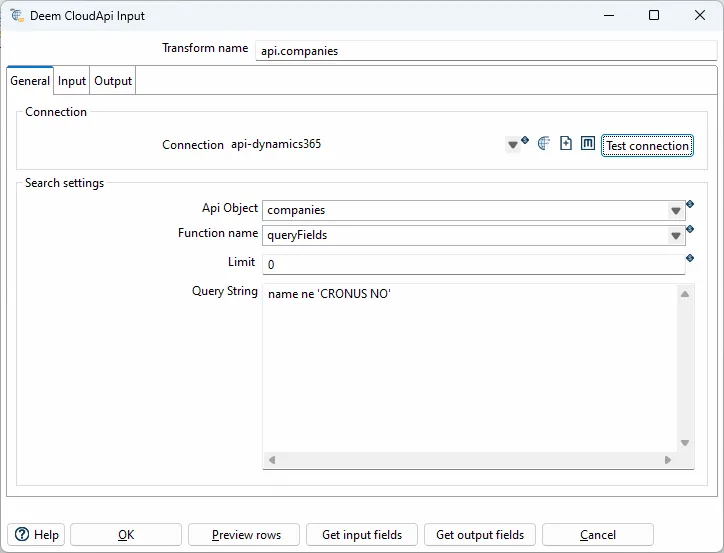
Configuration Options
Section titled “Configuration Options”| Option | Description |
|---|---|
| Transform name | Name of the transform |
| Client type | Set api type (e.g., ionapi-datalake) |
| Host | Set file URL to ?.ionapi file. Supports variables |
| Api object | Selected object. Select an existing object from the Datalake catalog |
| Function name | Select queryAll or query |
| Query string | Query string to compass or filter for the payload api |
Variables and some context objects for dynamic queries are supported. Use the ${VARIABLE_NAME} syntax to access JVM variables defined in kettle.properties.
Supported Client Types
Section titled “Supported Client Types”| Type | Description |
|---|---|
api:deem | Deem Insight |
api:dynamics365 | Microsoft Dynamics 365 |
api:ionapi-datalake | Infor Ion Datalake |
api:ionapi-m3 | Infor Ion M3 - M3 Api’s |
api:ionapi-m3-query | Infor Ion M3 - EXPORTMI query |
api:m3 | Infor M3 - M3 On-prem Api’s |
api:rambase | Rambase queries |
api:xledger | XLedger GraphQL |
Deem Insight
Section titled “Deem Insight”With the CloudApi client you can read and write to objects in the Deem Insight database.
Available Functions
Section titled “Available Functions”get- Get one record upon theridkey. Returns a single record matching the specified key.list- List selected fields from an object with actual filter. Use this for reading multiple records with filtering.upsert- Create or update record by setting all fields in the primary key. If the record exists (based on primary key), it updates; otherwise, it inserts.update- Update existing record usingridas key. Requires the record to exist.deleteHard- Delete record usingridas key. Permanently removes the record from the database.export- List selected fields from an object (key, name, ++ from related records are included). Includes related record information.dbExport- Export object to default data-warehouse database. Directly exports to the configured data warehouse.
Call M3 Api’s (On-prem). Metadata are loaded from MRS100 in M3.
Datalake
Section titled “Datalake”Payload (queryAll)
Section titled “Payload (queryAll)”The “Query string” field should only include the filter when using the queryAll function (Payload).
Examples:
dl_document_date gt '$sessiontime.addHours(${DATALAKE_HOURS})'dl_document_date gt '$sessiontime.addHours(-6)'dl_document_date gt '$sessiontime.addDays(${DATALAKE_DAYS})'dl_document_date gt $time.addDays(-2)dl_document_date range [$time.addDays(-2), $time.addDays(1)]dl_document_date range [2019-09-01T10:00:01.410Z, 2019-09-13T11:00:01.700Z]Compass (query)
Section titled “Compass (query)”The query function uses Compass query syntax. You can use SQL-like syntax with special variables:
select $fields from $object where timestamp>'$time.addHours(${DATALAKE_HOURS})'Available context variables:
$fields- Placeholder for selected fields$object- Placeholder for the selected API object$time- Current time object$sessiontime- Session time object${VARIABLE_NAME}- Custom variables from kettle.properties
Microsoft Dynamics 365
Section titled “Microsoft Dynamics 365”Query Context
Section titled “Query Context”| Field | Description |
|---|---|
date | QueryDateTime object with “yyyy-MM-dd” format |
datetime | QueryDateTime object with “yyyy-MM-dd’T’mm.ss.SS.‘Z’” format |
Input Fields
Section titled “Input Fields”| Field | Description |
|---|---|
company | Select company by id or name |
queryFilter | Filter (changed last 200 days) e.g: systemModifiedAt ge $datetime.addDays(-200) |
queryOrderBy | e.g: name asc |
Best Practices
Section titled “Best Practices”Error Handling
Section titled “Error Handling”- Handle API errors: Implement error handling for API failures, timeouts, and rate limits
- Retry logic: Consider implementing retry logic for transient failures
- Logging: Enable detailed logging to troubleshoot API issues
- Validation: Validate API responses before processing
Performance Optimization
Section titled “Performance Optimization”- Filter early: Use query filters to limit data retrieved from APIs
- Batch processing: Process data in batches when possible
- Pagination: For large datasets, implement pagination if the API supports it
- Connection pooling: Reuse connections when possible
Security
Section titled “Security”- Credentials: Store API credentials securely using variables or secure storage
- HTTPS: Always use HTTPS for API connections
- Authentication: Ensure proper authentication is configured for each API type
- Access control: Limit access to API credentials and configurations
Common Patterns
Section titled “Common Patterns”Incremental Load Pattern:
- Get Timestamp → Get last successful API call timestamp
- Cloud API → Read data filtered by timestamp
- Transform → Process API response data
- Output → Write to target system
API Synchronization Pattern:
- Cloud API (list) → Read all records from source system
- Transform → Compare with target system data
- Cloud API (upsert/update) → Synchronize changes to target system
Related
Section titled “Related”- Transforms Overview - Overview of all transforms
- Deem Datalake Input - Alternative Datalake input method
- Get Timestamp - Get timestamp for incremental API loads