

Bulk Loader
Overview
Section titled “Overview”The Bulk Loader transform streams data from inside Deem Integrator to a text file using LOAD DATA INFILE 'FIFO File' INTO TABLE .... into the database. This provides an efficient method for loading large volumes of data into database tables.
The transform uses a FIFO (First In, First Out) named pipe to stream data directly to the database, avoiding the need to write intermediate files to disk. This makes it one of the fastest methods for loading data into MySQL and compatible databases.
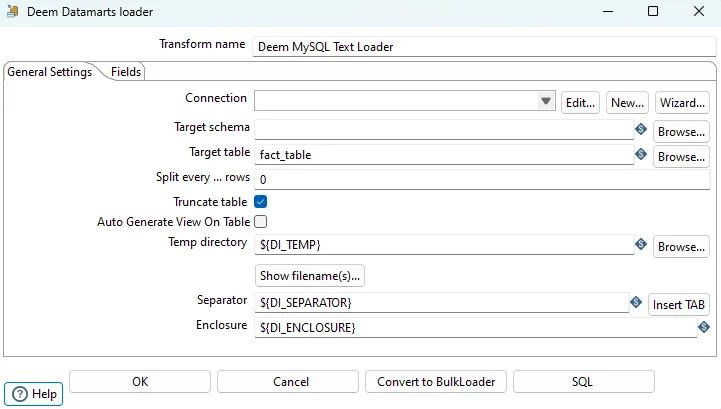
Configuration Options
Section titled “Configuration Options”| Option | Description |
|---|---|
| Transform name | Name of the transform |
| Connection | Select predefined database connection |
| Target schema | The name of the Schema for the table to write data to. This is important for data sources that allow for table names with dots ’.’ in it |
| Target table | Name of the target table |
| Split every … rows | To split the data loads in chunks of data after which the data load will be |
| Truncate table | Create new table before start loading data |
| Auto generate View on Table | The output are generated as a View. Each time the step are executed a new temporary table are created. Tables are created in a temporary database with “temp” as suffix. Tables in this temp databases have table name with suffix ‘0’ to ‘2_’. Remember to create database for temporary tables |
| Temp directory | Temp directory |
| Filename | This field specifies the filename and location of the output text file |
| Separator | The character used to separate (delimiter) fields |
| Enclosure | The enclosure used for strings |
Fields to Load
Section titled “Fields to Load”With the “Get fields” button you can load the fields from the stream.
Auto Generate View on Table
Section titled “Auto Generate View on Table”The output table are generated as a view. Each time the step are executed a new temporary table are created. Tables are created in a temporary database with “temp” as suffix. Tables in this temp databases have table name with suffix ‘0’ to ‘2_’.
Database Setup Required
Remember to create database for temporary tables. If the connection are mapped to a database with the name “dw_prd_datamarts” you need to create a database with the name “dw_prd_datamarts_temp”.
To store current temporary table number a control table with the name “bi_auto_view_control” in the datamarts database. This table have one record per tablename. Each time the loader are running the current table number are updated in the control table.
How It Works
Section titled “How It Works”- Temporary Table Creation: A new temporary table is created with suffix ‘0_’, ‘1_’, or ‘2_’
- Data Loading: Data is loaded into the temporary table
- View Update: The view is updated to point to the new temporary table
- Control Table: The control table tracks which temporary table number is currently active
This pattern allows for zero-downtime updates where the view always points to the most recent data while old temporary tables can be cleaned up later.
Best Practices
Section titled “Best Practices”Performance Optimization
Section titled “Performance Optimization”- Use for large datasets: Bulk Loader is most effective for datasets larger than 100,000 rows
- Split large loads: Use “Split every … rows” to break very large loads into manageable chunks
- Temp directory: Use a fast storage location (preferably SSD) for the temp directory
- Separator and enclosure: Choose appropriate separator and enclosure characters that don’t conflict with your data
When to Use
Section titled “When to Use”Use Bulk Loader when:
- Loading very large datasets (> 100K rows)
- Maximum performance is critical
- Using MySQL or compatible database
- You can use
LOAD DATA INFILEfunctionality
Consider Indexed Table Output instead when:
- You need automatic index creation
- You need more control over the insert process
- You’re working with smaller datasets
- You need upsert functionality
FIFO File Considerations
Section titled “FIFO File Considerations”- File system support: Ensure your file system supports named pipes (FIFO)
- Permissions: Ensure the process has read/write permissions for the temp directory
- Cleanup: FIFO files are automatically cleaned up after use
- Network storage: Avoid using network-mounted storage for temp directory if possible
Related
Section titled “Related”- Transforms Overview - Overview of all transforms
- Indexed Table Output - Alternative table output method
- Staging Upsert Output - Upsert to staging tables