

Deem DataLake Input
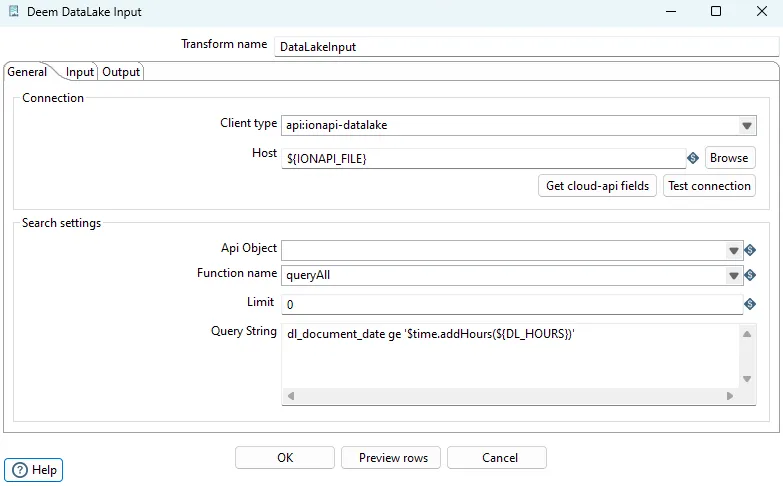
General options
| Option | Description |
|---|---|
| transform name | Name of the transform. |
| Client type | Set api:ionapi-datalake |
| Host | Set file url to ?.ionapi file. Supports variables. |
| Api object | Selected object. Select an existing object from the Datalake catalog. |
| Function name | Select queryAll or query queryAll - Payloads query - Compass Either you can change the IONAPI_FILE parameter in the kettle.properties file or you can browse and select the desired ionapi file. The kettle.properties file are located under the KETTLE_HOME/.kettle folder. |
| Query string | Query string to compass or filter for the payload api. Variables and some context objects for dynamic querys are supported. Use the $+{VARIABLE_NAME}+ syntax to access JVM variables defined in kettle.properties |
Payload (queryAll)
Section titled “Payload (queryAll)”The “Query string” field should only include the filter when using the queryAll function (Payload)
Examples:
dl_document_date gt ‘$sessiontime.addHours(${DATALAKE_HOURS})’ dl_document_date gt ‘$sessiontime.addHours(-6)’ dl_document_date gt ‘$sessiontime.addDays(${DATALAKE_DAYS})’
dl_document_date gt $time.addDays(-2) dl_document_date range [$time.addDays(-2), $time.addDays(1)] dl_document_date range [2019-09-01T10:00:01.410Z, 2019-09-13T11:00:01.700Z]
Compass (query)
Section titled “Compass (query)”select $fields from $object where timestamp>'$time.addHours(${DATALAKE_HOURS})'
Query context variables
| Variable | Description |
|---|---|
| $fields | gives a comma separated list of fields selected in the “Output” tab. |
| $object | gives the name of the table (object) selected in the “Api Object” field |
| $sessiontime | timestamp variable set to current time when the JVM starts. |
| $time | timestamp variable set to current time when the actual transformation starts. Example: $time $time.addHours(-6) $time.addDays(-1) $time.addMinutes(-120) $time.getYear() $time.getMonth() $time.getMonthNo() $time.getWeek() $time.getWeekNo() |