

Cloud Api
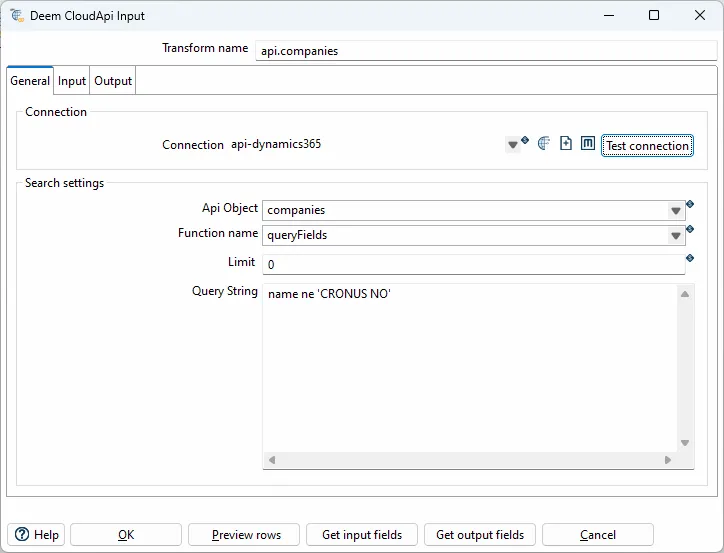
The Cloud api input transform supports basic CRUD (Create,read, update and delete) operations to different systems.
General options
| Option | Description |
|---|---|
| transform name | Name of the transform. |
| Client type | Set api:ionapi-datalake |
| Host | Set file url to ?.ionapi file. Supports variables. |
| Api object | Selected object. Select an existing object from the Datalake catalog. |
| Function name | Select queryAll or query. queryAll - Payloads query - Compass Either you can change the IONAPI_FILE parameter in the project properties file, or you can browse and select the desired ionapi file. The kettle.properties file are located under the KETTLE_HOME/.kettle folder. |
| Query string | Query string to compass or filter for the payload api. Variables and some context objects for dynamic querys are supported. Use the $+{VARIABLE_NAME}+ syntax to access JVM variables defined in kettle.properties |
| Type | Description |
|---|---|
api:deem | Deem Insight |
api:dynamics365 | Microsoft Dynamics 365 |
api:ionapi-datalake | Infor Ion Datalake |
api:ionapi-m3 | Infor Ion M3 - M3 Api’s |
api:ionapi-m3-query | Infor Ion M3 - EXPORTMI query |
api:m3 | Infor M3 - M3 On-prem Api’s |
api:rambase | Rambase queries |
api:xledger | XLedger GraphQL |
Deem Insight
Section titled “Deem Insight”With the CloudApi client you can read and write to objects in the Deem Insight database.
Functions:
- get, get one record upon the rid key
- list, list selected fields from an object with actual filter
- upsert, create or update record by setting all fields in the primary key
- update, update existing record using rid as key
- deleteHard, delete record using rid as key
- export, list selected fields from an object (key, name, ++ from related records are included)
- dbExport, export object to default data-warehouse database
Call M3 Api’s (On-prem). Metadata are loaded from MRS100 in M3.
Datalake
Section titled “Datalake”Payload (queryAll)
Section titled “Payload (queryAll)”The “Query string” field should only include the filter when using the queryAll function (Payload).
Examples:
dl_document_date gt '$sessiontime.addHours(${DATALAKE_HOURS})'
dl_document_date gt '$sessiontime.addHours(-6)'
dl_document_date gt '$sessiontime.addDays(${DATALAKE_DAYS})'
dl_document_date gt $time.addDays(-2)
dl_document_date range [$time.addDays(-2), $time.addDays(1)]
dl_document_date range [2019-09-01T10:00:01.410Z, 2019-09-13T11:00:01.700Z]
Compass (query)
Section titled “Compass (query)”select $fields from $object where timestamp>'$time.addHours(${DATALAKE_HOURS})'
Microsoft
Section titled “Microsoft”Dynamics365
Section titled “Dynamics365”Query context
Section titled “Query context”| Field | Description |
|---|---|
| date | QueryDateTime object with “yyyy-MM-dd” format |
| datetime | QueryDateTime object with “yyyy-MM-dd’T’mm.ss.SS.‘Z’” format |
Input fields
Section titled “Input fields”| Field | Description |
|---|---|
| company | select company by id or name |
| queryFilter | Filter (changed last 200 days) e.g: systemModifiedAt ge $datetime.addDays(-200) |
| queryOrderBy | e.g: name asc |